Twitter, launched in 2006, began as a simple microblogging platform where users shared short, 140-character messages called “tweets.” Its original purpose was to allow quick status updates, but it rapidly grew into a powerful tool for real-time communication. By the early 2010s, Twitter had become a key source for breaking news, public discourse, and global events, with features like hashtags and retweets helping organize conversations and amplify voices.
Over time, the platform expanded its capabilities. It increased the character limit to 280, introduced multimedia content (images, videos, live streaming), and shifted from a chronological timeline to an algorithm-driven feed that prioritizes engagement. These changes transformed Twitter from a simple messaging service into a complex social media ecosystem used by individuals, journalists, businesses, and governments.
In 2022, Elon Musk acquired Twitter, and in 2023 it was rebranded as X. This marked a significant shift in direction. The platform began evolving toward an “everything app,” incorporating longer posts, monetization tools for creators, subscription-based verification, and ambitions for financial services. At the same time, changes to content moderation and verification systems altered how information spreads and how users interact.
Today, X functions as a hybrid platform—combining elements of social networking, news distribution, and content creation. Its evolution reflects broader trends in social media: increased commercialization, algorithmic influence, and the growing role of digital platforms in shaping public conversation.
Potential dangers on the platform
While useful, X carries several risks—especially due to its speed and openness:
1. Misinformation & disinformation
False information spreads quickly, especially during breaking news.
Viral posts can outpace fact-checking.
Coordinated campaigns (political or otherwise) can manipulate narratives.
2. Harassment & abuse
Users may face trolling, hate speech, or targeted harassment.
Public replies and quote tweets can amplify attacks.
Anonymity can encourage more aggressive behavior.
3. Echo chambers & polarization
Algorithms often show content similar to what you engage with.
This can reinforce beliefs and limit exposure to differing views.
Political and cultural divisions can intensify.
4. Scams & impersonation
Fake accounts posing as brands, celebrities, or support staff.
Crypto scams, phishing links, and giveaway frauds are common.
Paid verification has sometimes made impersonation more convincing.
5. Mental health impact
Constant exposure to conflict, outrage, or negative news.
Comparison culture and pressure to perform publicly.
Addictive scrolling driven by engagement-focused design.
6. Data privacy concerns
Public posts are widely accessible and easily shared.
Personal information can be scraped or misused.
Users may unintentionally overshare.
Bottom line
X/Twitter has evolved from a simple microblogging site into a powerful, fast-moving global communication platform. Its strengths—speed, openness, and reach—are also what create its biggest risks. Using it effectively today requires a mix of media literacy, caution, and intentional use.
IS THIS A FAKE “X” ACCOUNT?
Just like the previous platforms discussed, scammers and fraudsters used “X” as well. This section will show how to dig and find the user ID for X profiles.
Spotting a fake account on X (Twitter) takes a bit of pattern recognition. No single sign proves it, but a combination usually tells the story.
Key signs an account may be fake
1. Suspicious profile details
Generic or stolen profile photo (often overly polished or stock-looking)
Username with random numbers or slight misspellings (e.g., @ElonMusk_12345)
Bio is vague, overly promotional, or copied
2. Recently created account
Very new accounts (days or weeks old) pretending to be established figures are a red flag
Check the “Joined” date on the profile
3. Follower vs. following imbalance
Following thousands but with very few followers
Or sudden large follower counts with little real engagement (possible bots)
4. Low-quality or repetitive content
Posts are repetitive, generic, or copied from others
Mostly retweets with no original thoughts
Content doesn’t match the claimed identity
5. Unusual behavior
Replies that feel automated or irrelevant to the conversation
Aggressive promotion (crypto, giveaways, links)
Sends unsolicited DMs, especially asking for money or personal info
6. Engagement doesn’t add up
Lots of likes but very few meaningful replies
Comments that look like bots (generic phrases like “Nice!” or “Great post!”)
7. Impersonation clues
Slight variations of a real account’s handle or name
Claims to be a company or celebrity but:
No official website link
No history of credible posts
Even with a checkmark, confirm—verification is now paid and not always proof of authenticity,
INTELLIGENCE GATHERING
FINDING THE “X” USER ID
“X” users also have a unique numerical ID number assign to the profile. This method is a little more involved but still simple to conduct. Instead of using the page source, we will be looking for it using the inspect element method.
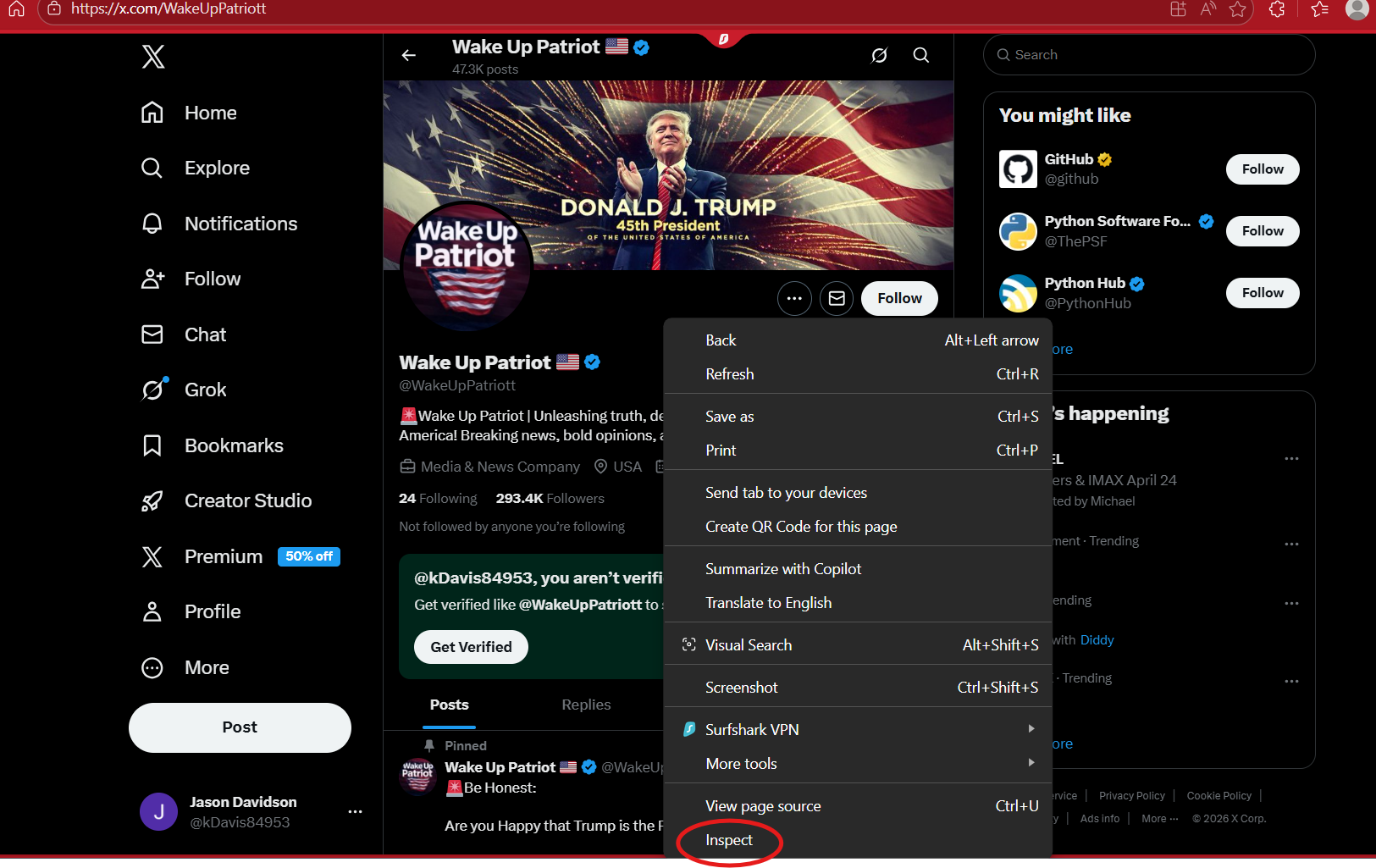
Using the profile show above, we will find the user ID to this profile. First, using a computer, you want to right click on the mouse, scroll down and select “Inspect Element”.
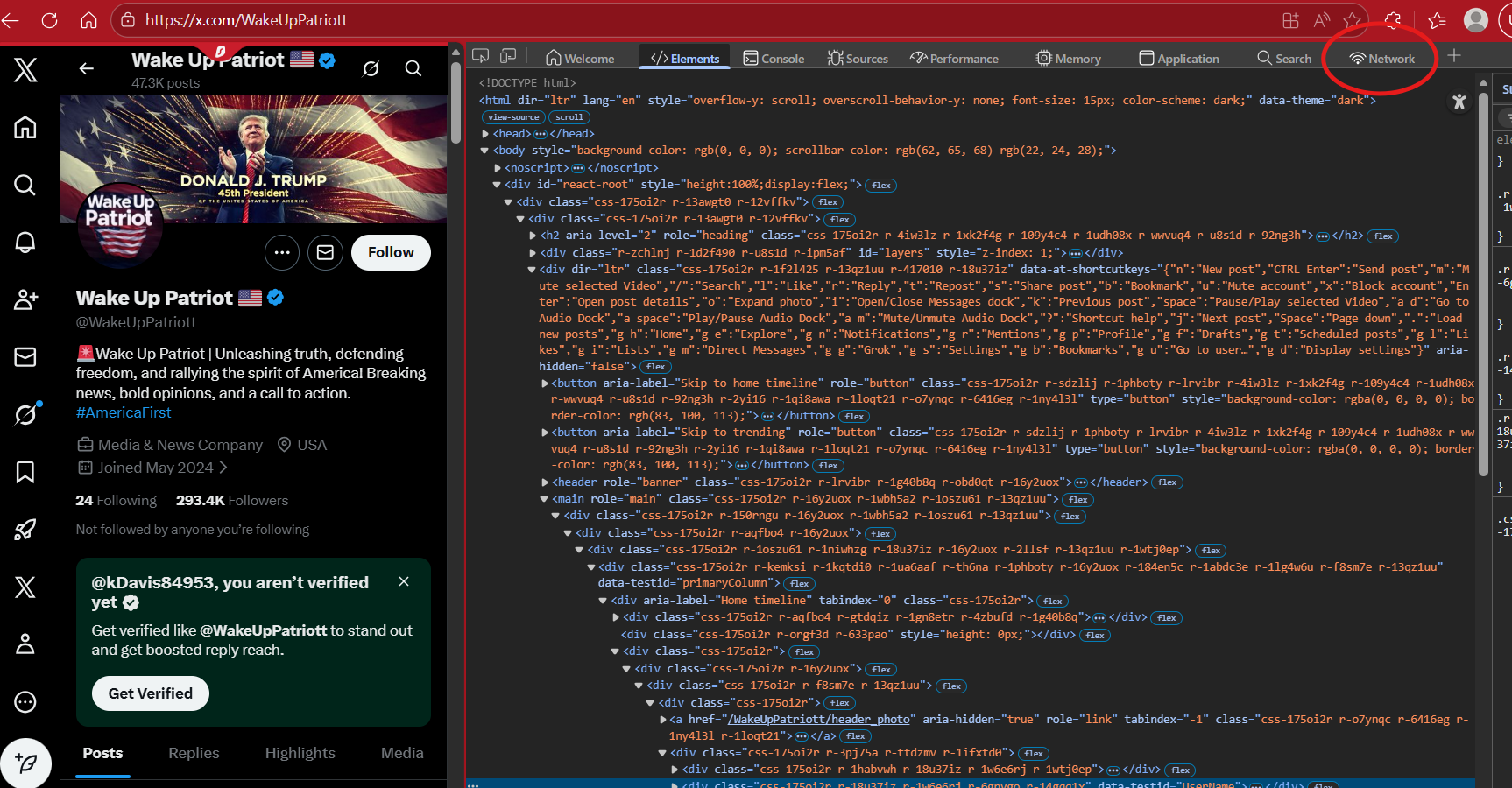
This will open up some tabs, and you will see some HTML coding. Now worries, this is simple. Below shows what you will see. You want to select the tab that says “Network”.
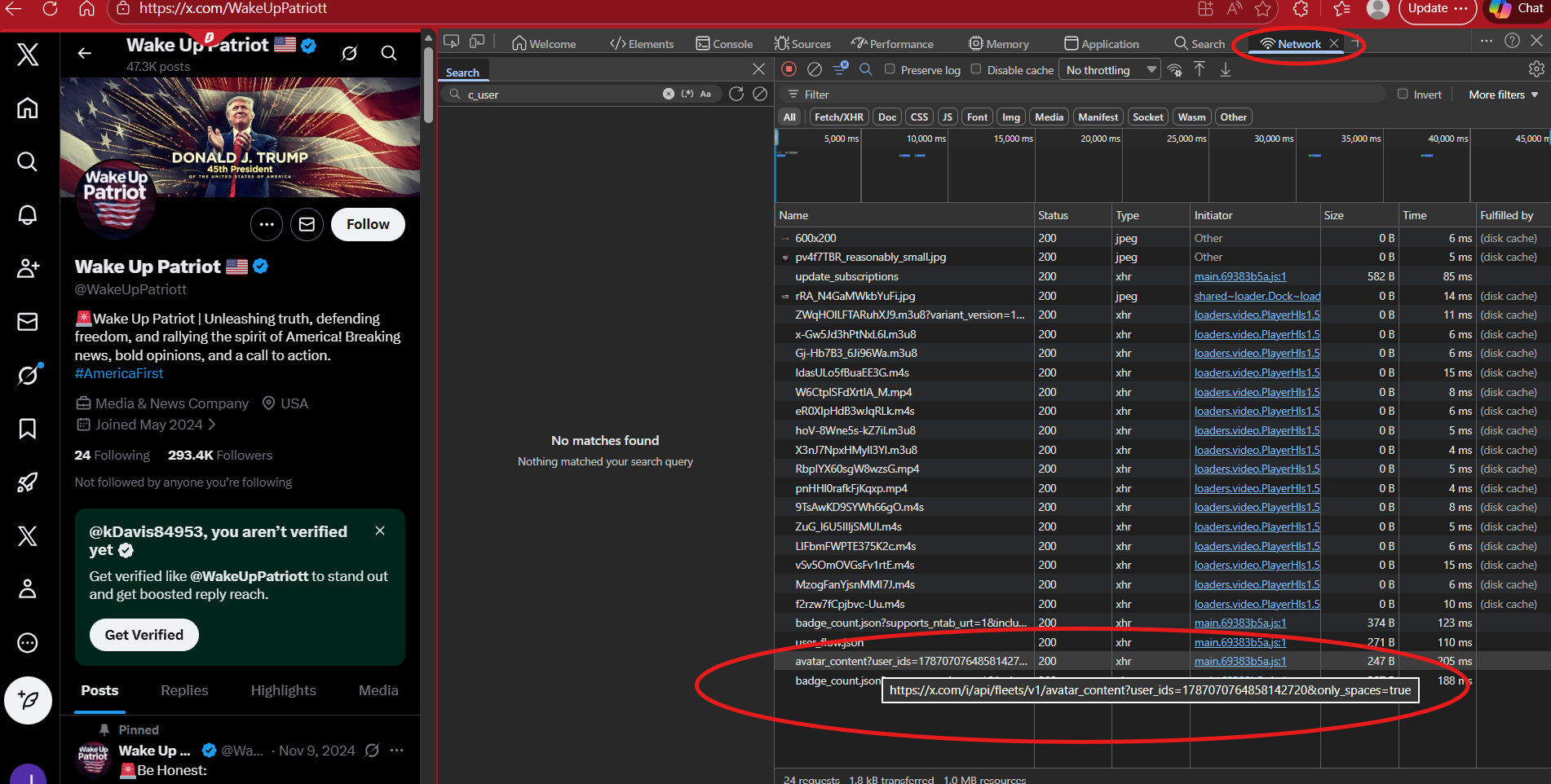
Once the “Network” tab has been selected, you will see a panel that says “Name”. Look for the following:
https://x.com/i/api/fleets/v1/avatar_content?user_ids=
This will show the user ID to the profile. If you click on it, it will open up the Header information under the “Header” tab.
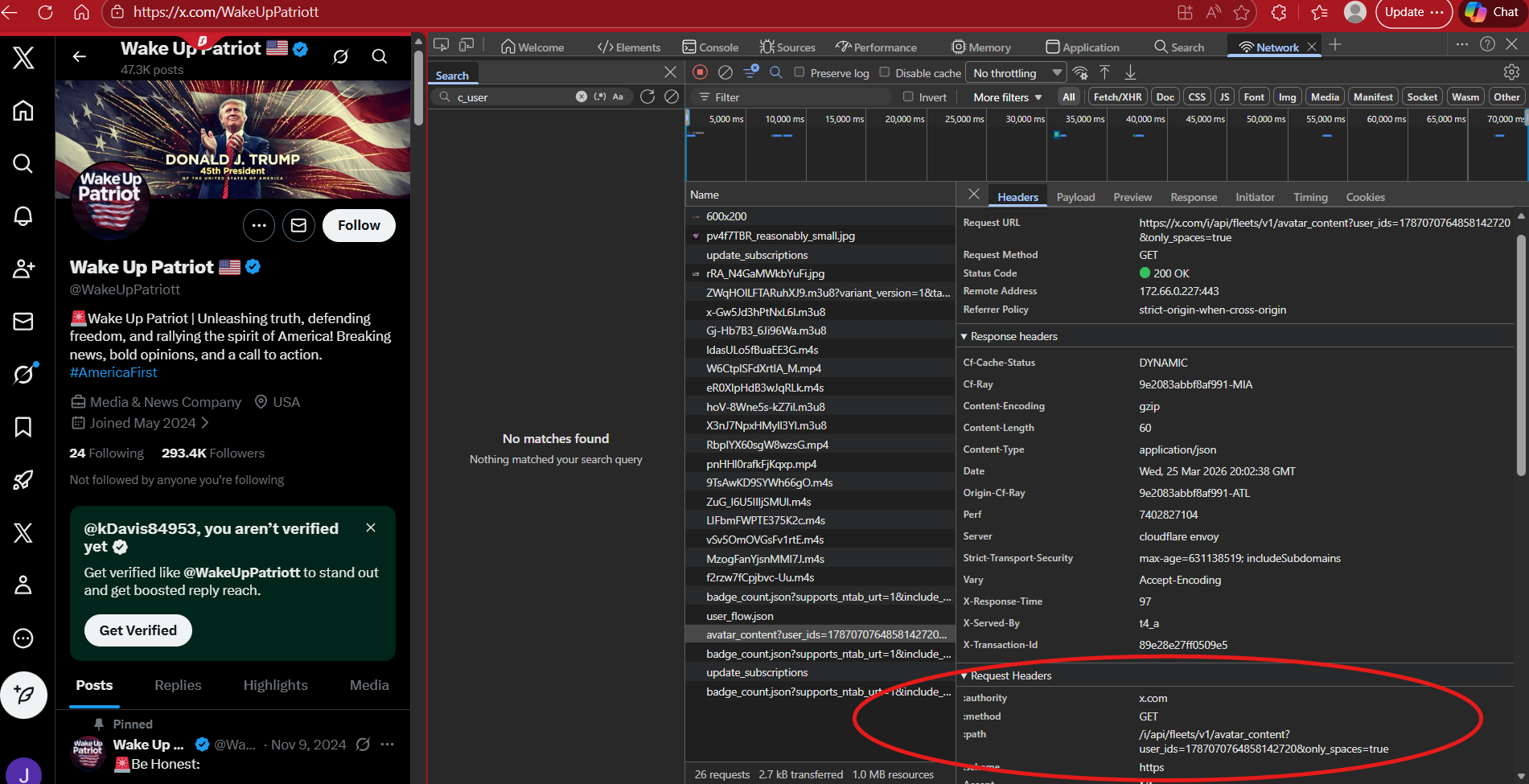
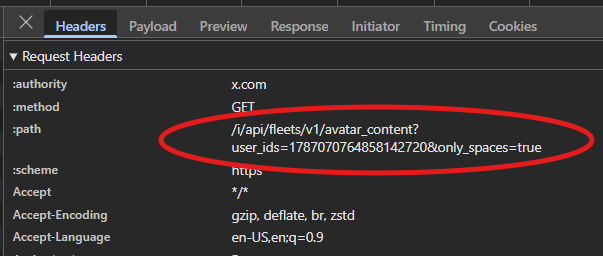
If you scroll down a bit, you will find where it says “:path” and then a url that contains user_ids= and the number. This is the profile’s user ID.
You can confirm this by plugging in the profile’s url with the numerical ID as follows:
https://twitter.com/intent/user?user_id="NUMBER”
If the profile shows, then you found the correct user ID to that profile.